I shoot my grandkids a lot. And more than once I’ve watched a face go from lit to shadowed to lit again, all in the same ten seconds, because somebody wandered from the window to the doorway and back.
The phone didn’t stop recording. It just kept changing its mind. And every time it changed its mind, so did the exposure on their face.
The Miss
Most people think once you hit record, the decision’s made. Wrong. Your phone is still deciding, the whole time you’re filming. Every frame, it’s asking itself the same question over and over. What’s the right exposure for this scene right now. And every time somebody moves, or a cloud shifts, or a kid walks past a window, it asks again and answers again.
That’s the pulsing. That’s the breathing. That’s your video getting brighter and darker for no reason you can name. There’s a reason. Your phone’s reconsidering, the same panic it goes through taking still photos in low light, just showing up here in video, for the exact same reason.
The phone’s not confused. It’s just guessing out loud.
The Photo Lab
The Lesson + Lab
I spent years spinning rings on real lenses. Aperture ring, focus ring, you feel the decision under your fingers, you know exactly when you made it. Video on a phone took that feeling away. No ring to spin. Just a screen, quietly renegotiating exposure every second you’re rolling.
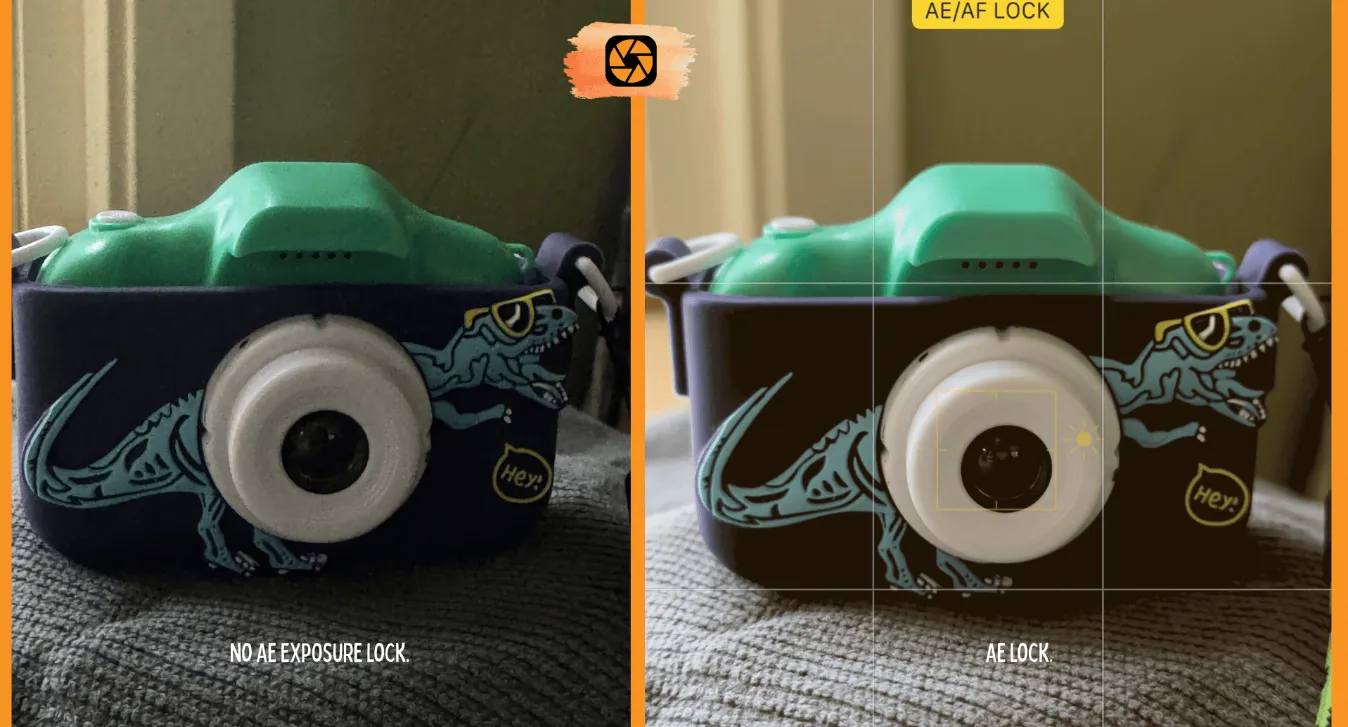
Turns out the decision didn’t disappear. It just changed shape. On a phone, it’s called AE/AF lock, auto exposure, auto focus lock, and it does exactly what spinning that ring used to do. It tells the camera, stop guessing, I’ve got this one.
Tap and hold on your subject, usually a face, until you see the lock indicator show up on screen. That’s it. Exposure’s yours now. The phone will keep the focus and brightness pinned to that spot even if somebody walks in front of a window or the light shifts behind them. You can usually drag up or down right there to brighten or darken it further, same as easing a ring open or closed.
This matters most with faces, because a phone left to its own devices will happily expose for whatever’s brightest in frame, a window, a lamp, the sky, and let the actual person you’re filming go dark. Own the camera, own the picture didn’t stop applying just because you traded a real camera for the thing in your pocket. It just found a new gesture. Tap and hold instead of turning a ring.
Try This
Find a spot where the light changes, a doorway, a window, somewhere someone can walk from shade into sun. Film ten seconds letting the phone guess on its own. Then film it again, tap and hold on their face the second you hit record. Watch the difference on playback. One of those clips is the phone thinking out loud. The other one’s you, deciding.
Reflection + CTA
You already know how to make this decision. You made it a hundred times with a ring under your fingers.
The phone just asked you to make it a different way.
Trust it. Trust yourself.
-TMac #shooton
